Guide
Using Cursor with your own Ollama models, via Amallo
Aug 24, 2026
Cursor defaults to hosted models: OpenAI, Anthropic, whichever provider you've added a key for. That means your code leaves your machine on every request, and it means paying per token for something your own hardware might already be able to run. If you've got Ollama running locally, Cursor can talk to it directly. The missing piece is an endpoint it can actually reach.
This is the full setup: Ollama running the model, Amallo turning it into an endpoint Cursor understands, and Cursor pointed at it.
1. Get Ollama running with a coding model
Ollama needs to already be running with a model pulled before Amallo has anything to serve. Pick a model built for code (qwen2.5-coder and deepseek-coder are common choices) and pull it:
ollama pull qwen2.5-coder
Confirm it answers locally before moving on:
ollama run qwen2.5-coder "print hello world in rust"
By default this is bound to 127.0.0.1:11434, which is exactly what Amallo expects, so there's nothing to change here.
2. Install Amallo and get your endpoint
Install Amallo for macOS or Windows on the same machine as Ollama. It finds Ollama on 127.0.0.1:11434 automatically and opens with a base URL and key already generated:
base_url = https://relay.41tunnels.com/v1
api_key  = 41t_9f2c…
This works whether Cursor is running on the same machine or a different one entirely: a laptop, a VPS, anywhere Relay is reachable from.
3. Point Cursor at it
Everything you need to change lives on one screen: Cursor Settings → Models.
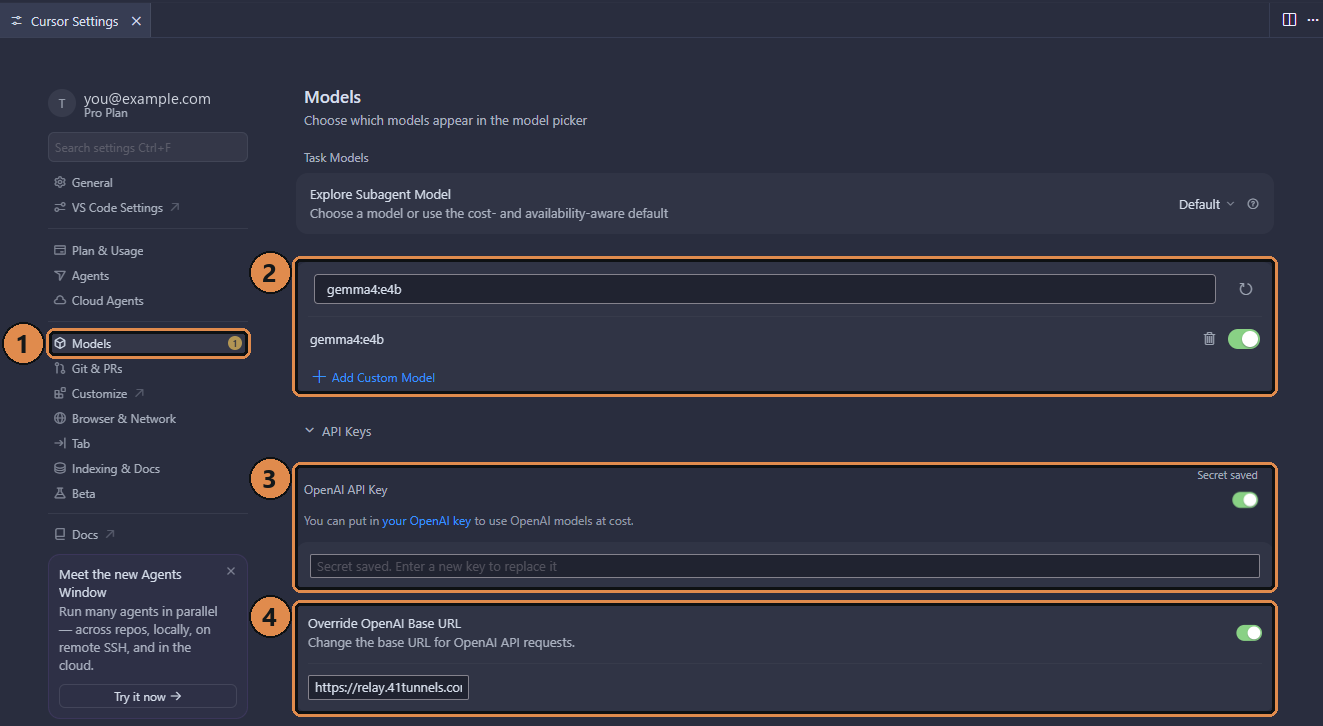
Cursor on Windows; the macOS panel is laid out the same. The four fields that matter are numbered to match the steps below. View full size
- Open Cursor Settings and pick Models in the sidebar. Everything below is on this one page.
- Add the model with
+ Add Custom Model. Use the exact tagollama listprints:qwen2.5-coder, not a display name or shorthand. That's the identifier Amallo forwards straight through to Ollama. (The install in the screenshot happens to havegemma4:e4bpulled; yours will show whatever you pulled in step 1.) - Put Amallo's key in OpenAI API Key and turn the toggle on. It's the
41t_…value from Amallo's window, not a key from OpenAI. Cursor only uses this field as "the key for whatever the base URL points at". - Turn on Override OpenAI Base URL and paste the base URL Amallo gave you, the one ending in
/v1. This is the setting that sends requests to your own machine instead of OpenAI's servers.
Switch Cursor's active model to it and send a test prompt. If it answers, the whole chain (Cursor, Relay, Amallo, Ollama) is working.
If it doesn't answer
- Wrong model name. Cursor needs the exact tag
ollama listshows, not a friendly name. - Ollama not running, or bound to the wrong address. Amallo only finds it on
127.0.0.1:11434. If you've changedOLLAMA_HOST, point it back to loopback rather than opening it up (see exposing Ollama to the internet safely for why). - Stale key. If you've regenerated Amallo's key since setting Cursor up, the old one is rejected immediately. Copy the current one from Amallo's window.
The same base URL and key work unchanged for Continue or Aider, if you use either alongside or instead of Cursor. See giving Cursor, Continue, or Aider an OpenAI-compatible endpoint for the other two.