Guide
Giving Cursor, Continue, or Aider an OpenAI-compatible endpoint to your own machine
Aug 24, 2026
Cursor, Continue, and Aider all support pointing at a custom OpenAI-compatible endpoint instead of a hosted provider. It's how people already run local models with them, as long as the coding client and Ollama are on the same machine, or at least the same network. That stops working the moment your models live on a different box than the one you're coding on: a beefier desktop in another room, a home server, a machine you're not physically in front of.
The fix isn't a different setting in any of the three tools. It's making your Ollama reachable at all, the same way it would need to be for any other remote client.
The endpoint each of them wants
All three ultimately want the same three things: a base URL, an API key, and a model name.
base_url = https://relay.41tunnels.com/v1
api_key  = 41t_9f2c…
model    = llama3.1:8b
- Aider reads
OPENAI_API_BASEandOPENAI_API_KEYfrom the environment, or accepts them as flags, no code change, just point the existing OpenAI-compatible config at a different URL. - Continue takes an
apiBasefield in its model config alongside the API key, the same shape, in its own config file. - Cursor has a setting for overriding the OpenAI base URL and key it uses for custom models.
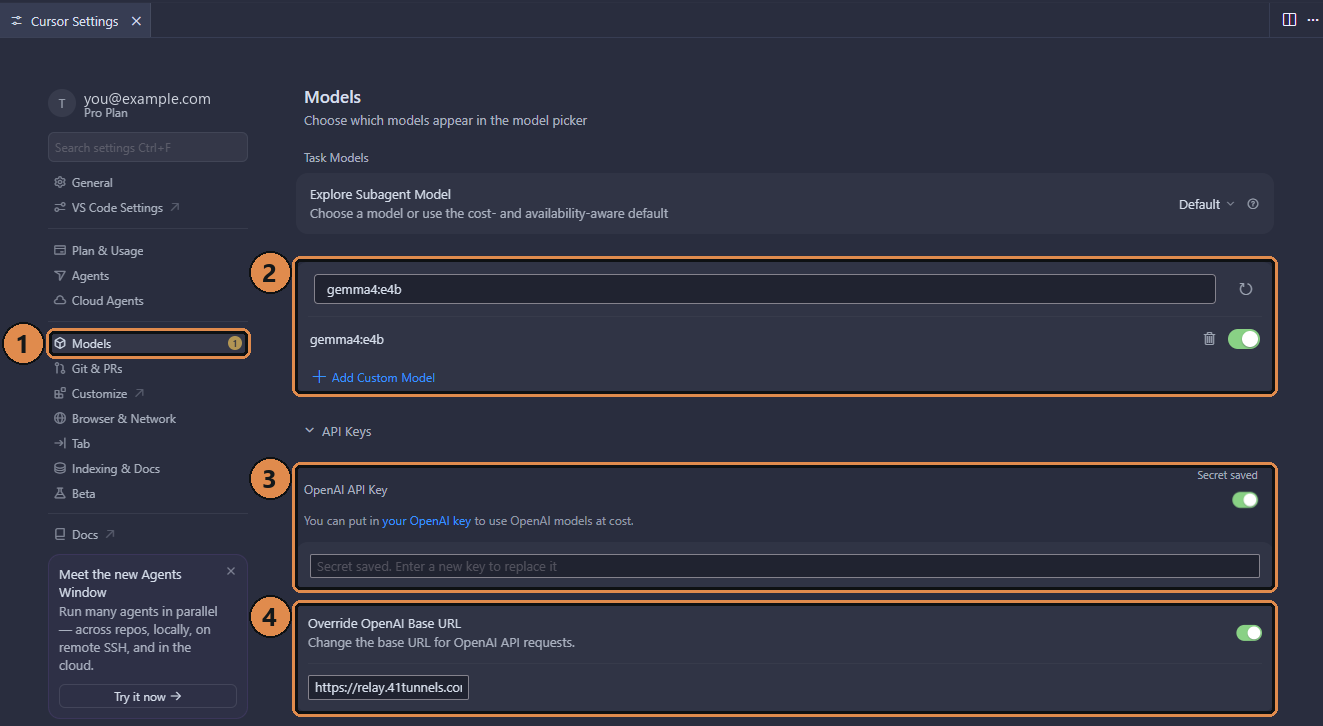
Cursor's version of those three values: the model name under Models (2), the key under OpenAI API Key (3), and the base URL under Override OpenAI Base URL (4). Step by step in using Cursor with your own Ollama models. View full size
None of them need to know or care that the URL points at a machine in another room instead of OpenAI's servers. That's the entire appeal of the OpenAI-compatible API shape, and it's why this works with anything else that speaks it too.
If a client has no API key field
A few clients give you somewhere to put a URL and nowhere to put a key. For those, Amallo offers a second URL with the key built into the path, under Client only accepts a URL? in the endpoint card:
https://relay.41tunnels.com/41t_9f2c…/v1
Use that on its own, with no API key set. It is a credential in its own right, so treat it like the key: it ends up in access logs, Referer headers, and browser history in a way the plain base URL does not, and it changes every time you regenerate the key.
Reach for it only when a client leaves you no choice. If there is an API key field, the plain base URL and a separate key is the better arrangement — and if you leave a stale key sitting in a path-form URL, it wins over the fresh one you just pasted into the key field, which reads as a wrong-key error on a key that is perfectly good.
Getting the endpoint in the first place
- Have Ollama running on the machine with the models, bound to
127.0.0.1:11434. - Install Amallo on that same machine. It opens with a base URL and key already generated.
- Put those values into whichever of Cursor, Continue, or Aider you're using, in the form above.
The connection back to your machine goes through Relay, which is what makes the URL reachable from your laptop, a VPS, or a CI runner: anywhere your editor happens to be running, not just the machine sitting next to the GPU.